
We’ve been full-time RVing since 2019, and one thing we learned pretty quickly is that planning a road trip in a 38-foot Class A motorhome is a lot different from planning a trip in a car. Low clearances, weight restrictions, steep grades, campground access, fuel stops, and even how far we want to drive in a day all come into play before we ever hit the road.
That’s where RV LIFE Pro and RV Trip Wizard have become part of our trip-planning routine. We’ve used RV Trip Wizard to plan dozens of RV trips, including a 43-stop journey across the country in 2023. It gives us a big-picture look at our route, helps us find campgrounds and stops along the way, and lets us plan around the size and weight of our motorhome.
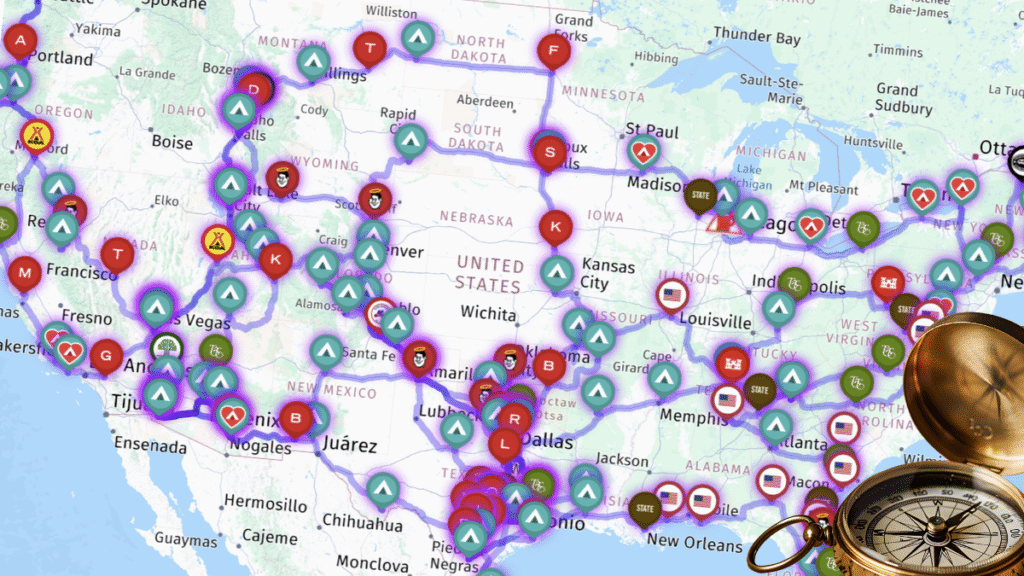
We don’t rely on RV LIFE for everything. We still prefer our dedicated Garmin RV GPS for navigation while we’re driving. But when it comes to sitting down and actually building an RV trip—choosing our route, deciding how far we want to travel each day, and figuring out where we’re going to stay—RV Trip Wizard is one of the main tools we use.
In this RV LIFE Pro review, we’ll show you how we actually use RV Trip Wizard as full-time RVers, what we like about it, what we don’t use, and whether we think an RV LIFE Pro subscription is worth the money.
This post contains affiliate links. As a participant in Amazon Associates and various affiliate programs, we are compensated when qualifying purchases are made through our referral links at no additional cost to you. Full Disclosure
Our Take: Is RV LIFE Pro Worth It?
Yes—for the way we travel, RV LIFE Pro is worth it. We’ve been using RV LIFE Pro since 2020, and RV Trip Wizard has become one of our main tools for planning RV trips. We use it for trips big and small, including our biggest so far—a 43-stop journey across the country in 2023.
We don’t use every RV LIFE Pro feature equally. Trip Wizard is the main reason we subscribe, and we also use RV LIFE Campgrounds to research campgrounds and read reviews from other RVers. When we’re actually driving, we still prefer our dedicated Garmin RV GPS for turn-by-turn navigation.
Why RV Trip Planning Is So Important
Planning an RV trip involves a lot more than finding the fastest route from Point A to Point B. When we’re traveling in our motorhome, we need to think about whether the roads are suitable for our rig, where we’ll stay, how far we want to drive that day, and whether we’ll have fuel stops that are easy to get in and out of.
Regular navigation apps can be useful for checking traffic or getting around once we’ve parked the RV, but we don’t rely on them alone when planning a motorhome route. They aren’t designed around the height, weight, length, and other restrictions that matter when you’re driving a large RV.
We also like to know more than just which roads we’ll be taking. When planning a longer trip, we’re looking at campgrounds, driving distances, fuel stops, elevation changes, and interesting places we might want to visit along the way. Sometimes the route itself changes because we find something worth stopping for.
That’s one of the reasons RV Trip Wizard works so well for the way we travel. Instead of planning the route in one place, researching campgrounds somewhere else, and trying to piece everything together, we can build much of the trip in one place and see how the individual stops fit into the overall journey.

What Is RV LIFE Pro?
RV LIFE Pro is a subscription service designed specifically for RV travelers. Rather than being just one trip-planning app, a Pro subscription gives you access to several connected RV travel tools for planning routes, researching campgrounds, navigating while you’re on the road, and keeping track of RV maintenance.
A current RV LIFE Pro subscription includes:
- RV LIFE Trip Wizard – The feature we use the most. It lets you build multi-stop RV trips, plan RV-safe routes based on your rig, research campgrounds and points of interest, estimate fuel costs, and see how your entire trip fits together.
- RV LIFE Mobile App & RV Safe GPS – Provides RV-specific turn-by-turn navigation based on details such as your RV’s height and weight. It also offers offline navigation, and Trip Wizard can now be accessed directly through the mobile app.
- RV LIFE Campgrounds – A campground research database with more than 30,000 campgrounds, including reviews from other RVers, photos, campground details, amenities, and RV-specific information.
- RV LIFE Maintenance – Lets you create maintenance schedules and reminders, track maintenance costs, and keep records for your RV.
- RV LIFE Masterclass – A collection of RV-related courses covering subjects such as RV ownership, full-time RVing, boondocking, maintenance, and other aspects of RV travel.
For us, Trip Wizard is the main reason we have RV LIFE Pro. We use it to plan all of our RV trips, whether we’re heading to one campground for a short stay or putting together a long, multi-stop journey. Our biggest trip so far was a 43-stop journey in 2023, but Trip Wizard is part of our planning process for trips both big and small.
How Much Does RV LIFE Pro Cost?
RV LIFE Pro currently costs $65 per year, and the annual subscription includes a 7-day free trial. There’s also a $19.99 monthly option, but it does not include the free trial.
If you’re considering RV LIFE Pro, the annual plan makes considerably more sense for frequent RV travelers. At $65 for the year, it costs less than four months of the monthly plan.
How We Use RV Trip Wizard to Plan Our RV Trips
We use RV Trip Wizard for all of our RV trips, whether we’re moving to a campground a few hours away or planning a months-long journey with dozens of stops. As soon as we start putting together an RV trip, Trip Wizard is usually one of the first tools we open.
We start by entering our destinations and getting a look at the overall route. From there, we can begin breaking the trip into manageable travel days and deciding where we want to stop along the way.
Setting Up Our Motorhome in Trip Wizard
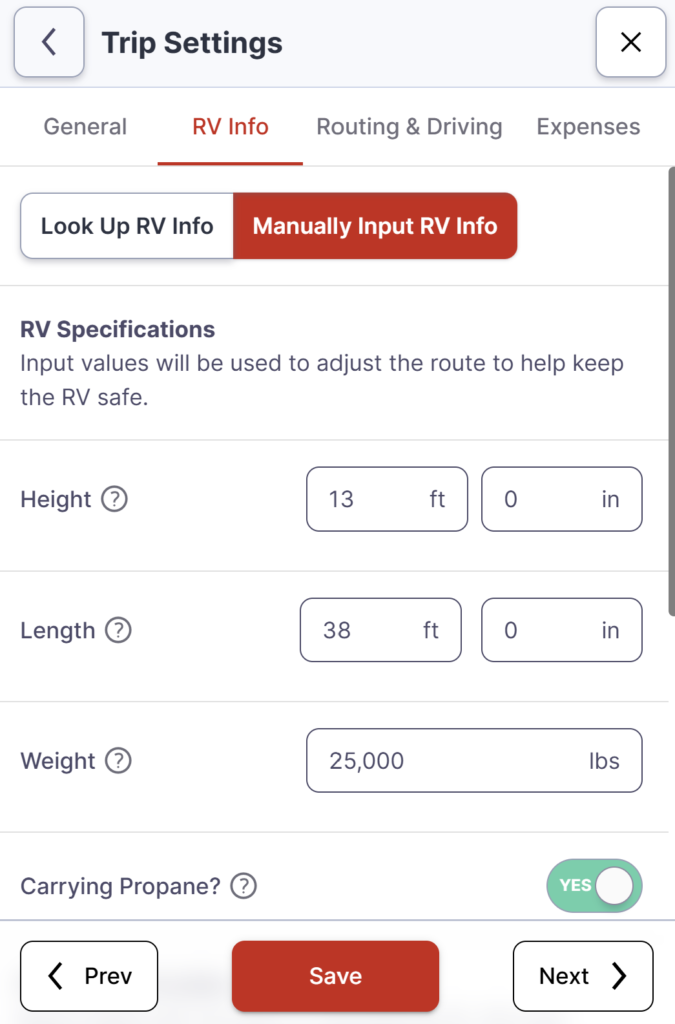
One of the important differences between RV Trip Wizard and a regular trip planner is that we can enter information about our motorhome. We’re traveling in a 38-foot Class A, so we don’t want a route planned as if we’re driving a passenger car.
Trip Wizard can use information about your RV, including its height and weight, when calculating RV-safe routes. You can also set routing preferences to avoid things such as tolls, ferries, tunnels, highways, and unpaved roads.
RV-specific routing is especially important when we’re traveling through mountainous areas. We’ve driven plenty of challenging roads in our motorhome, including an 8% grade on Route 40 through Pennsylvania. Route planning helps, but knowing how to safely handle those climbs and descents is just as important.
We still review the route ourselves before traveling—we never blindly follow any GPS or routing program—but having a route designed around an RV gives us a much better starting point.
Planning How Far We Want to Drive
One of our favorite Trip Wizard features is the Driving Radius.
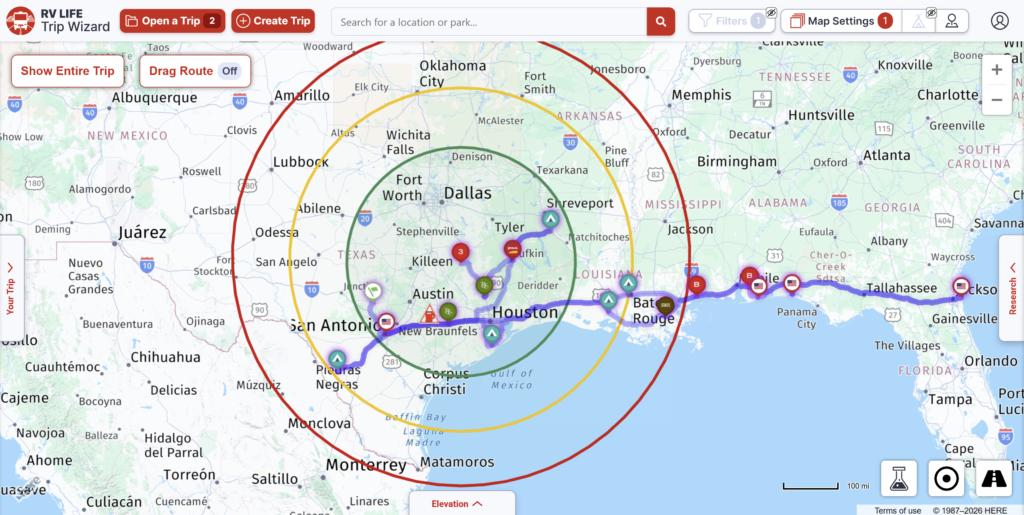
We currently have our Driving Radius set to show 200, 300, and 400-mile ranges. Rather than picking a campground and then discovering it’s farther than we really wanted to travel that day, we can quickly see which potential stops fall within the distances we’re comfortable traveling.
That makes it much easier to look for campgrounds and overnight stops within a realistic travel day.
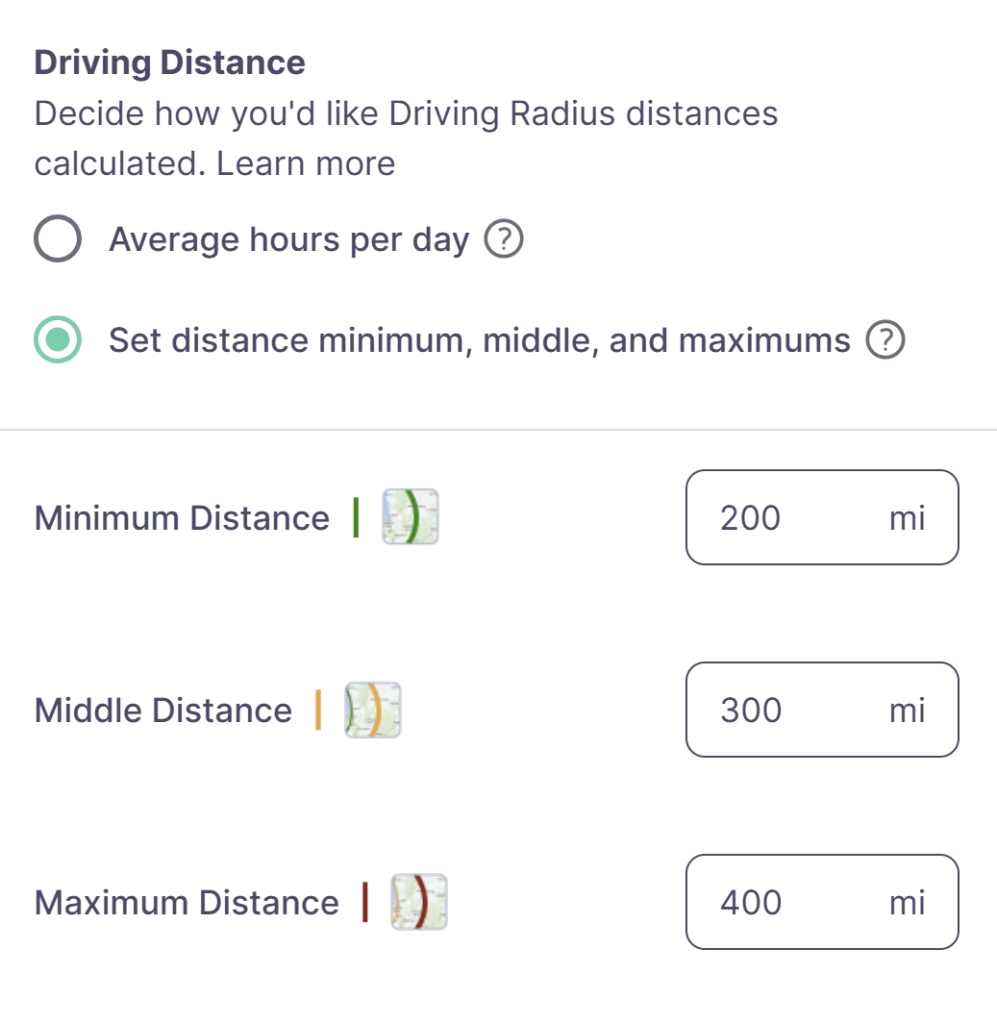
We also try to follow the 3-3-3 Rule of RVing when it makes sense—keeping our travel days around 300 miles or less, arriving by about 3 p.m., and staying at least three nights when our schedule allows. Our 300-mile middle radius gives us a quick visual reference when we’re deciding where we might stop next.
Read more about how we use the 3-3-3 Rule to make RV travel days less stressful.
This becomes especially useful on longer trips. We don’t necessarily want to drive the maximum distance possible every day. Sometimes we’d rather have a shorter travel day, get into the campground earlier, get set up, and still have part of the day left to enjoy where we are.
When we’re actually building a trip, those distance ranges appear directly on the map. The screenshot below shows part of our 2026 RV travels, with our route and the 200, 300, and 400-mile Driving Radius rings displayed around our location. It gives us an immediate visual idea of how far potential destinations are from where we’re starting.
Finding Campgrounds Along the Route
Once we have a general route and an idea of how far we want to travel each day, we can start looking at campgrounds along the way.
Instead of jumping back and forth between a route planner and separate campground searches, Trip Wizard puts campground information on the map with our route. We can look at potential stops, campground details, and reviews from other RVers while figuring out how each campground fits into the trip.
We can also add points of interest and fuel stops, which helps turn a basic route into an actual travel plan.
We Use It for Short Trips, Too
It’s easy to look at a tool like RV Trip Wizard and assume it’s mainly for cross-country adventures, but that’s not how we use it.
Even if we’re only traveling between a couple of campgrounds, we’ll often put the trip into Trip Wizard. We still want to know what the route looks like, how far we’re traveling, whether there are any routing concerns, and what options we have along the way.
For a short trip, planning may only take a few minutes. For a major trip, we can spend considerably more time working through the route and adjusting stops.
Our Biggest Trip: 43 Stops in 2023
Our biggest Trip Wizard plan so far was our 43-stop journey across the country in 2023.
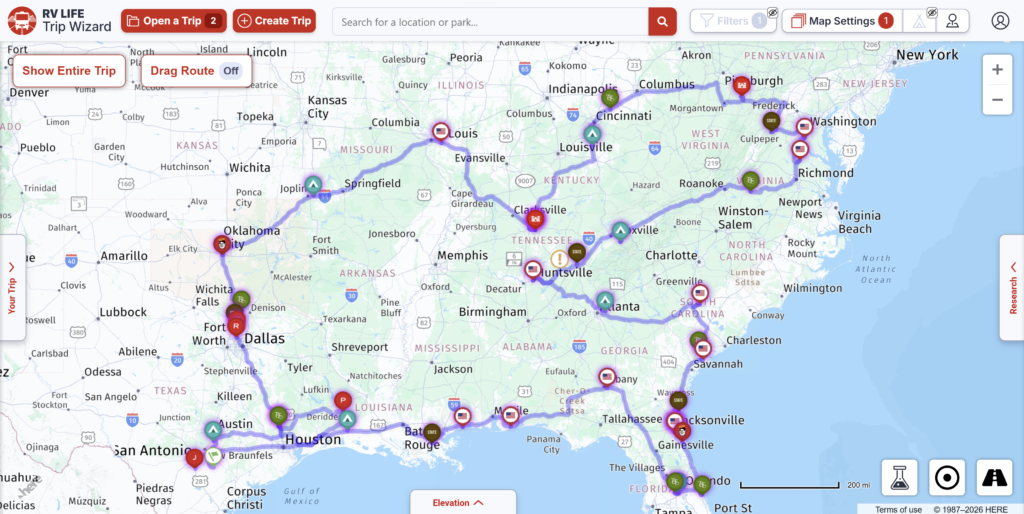
A trip that size is where being able to see everything in one place really becomes valuable. Instead of looking at 43 individual travel days as separate trips, we could see the entire journey, adjust stops, check driving distances, research campgrounds, and see how changing one part of the trip affected everything that came afterward.
But the 43-stop trip isn’t the exception to how we use Trip Wizard—it’s simply the biggest example. The same tool we used to put together that huge journey is the one we still open when we’re planning our next campground move.
That’s probably the best way to describe why RV Trip Wizard has remained part of our RV travel routine: it works for the way we travel, whether the next trip has two stops or forty-three.
RV LIFE Trip Wizard vs. Garmin RV GPS
One question that comes up when looking at RV LIFE Pro is whether you still need a dedicated RV GPS. For us, the answer is yes—but that’s because RV Trip Wizard and our Garmin RV GPS serve different purposes in the way we travel.
We use RV Trip Wizard primarily for planning before we hit the road. That’s where we build the trip, choose campgrounds, look at driving distances, check the overall route, and make adjustments to our stops.
Once we’re actually driving the motorhome, we prefer our Garmin RV GPS for turn-by-turn navigation.
Why We Prefer Garmin While Driving
We like having a dedicated GPS mounted where it’s easy to see while we’re driving. Our Garmin is set up with our motorhome information and provides RV-specific routing, upcoming turns, road information, and other navigation details without requiring us to use a phone for our primary navigation.
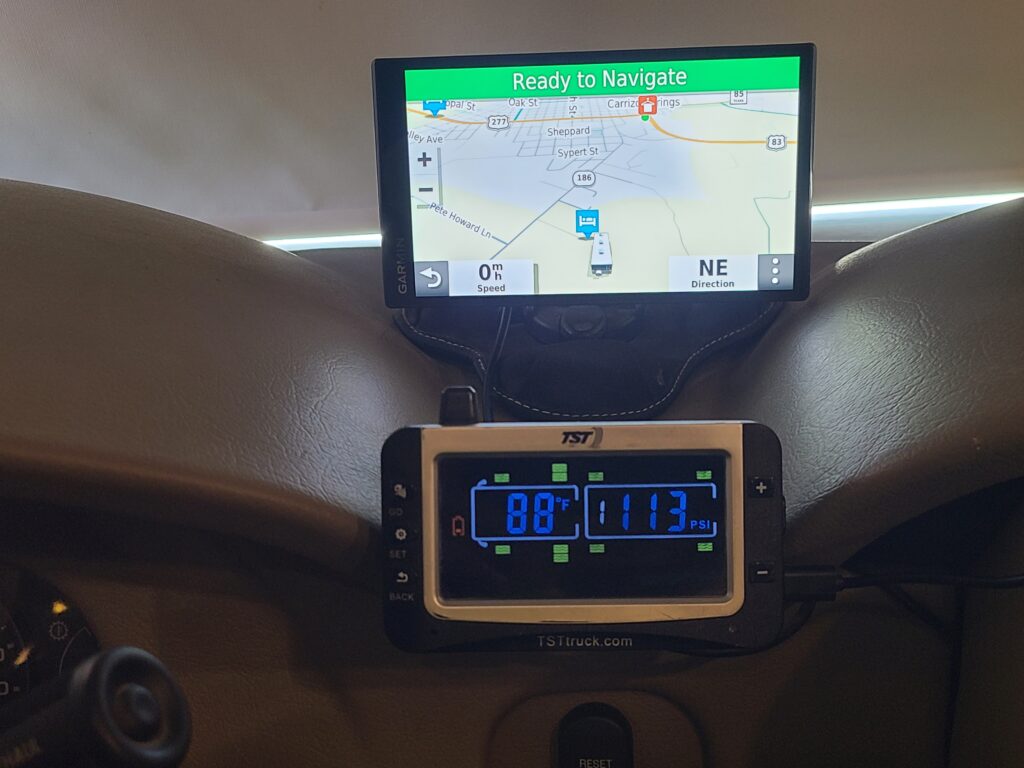
That doesn’t mean you need a Garmin to use RV LIFE Pro. The RV LIFE mobile app includes RV Safe GPS navigation based on your RV’s dimensions and weight, so you can use RV LIFE for both planning and navigation if that’s what you prefer.
For us, though, the Garmin remains our primary navigation device once we’re on the road.
Read our Garmin RV GPS guide to see why we use a dedicated Garmin for RV navigation.
You Can Transfer a Trip Wizard Route to a Garmin GPS
There’s another useful option for RVers who want to use both systems: you can export a trip from RV Trip Wizard as a GPX file and transfer the trip to a compatible Garmin GPS.
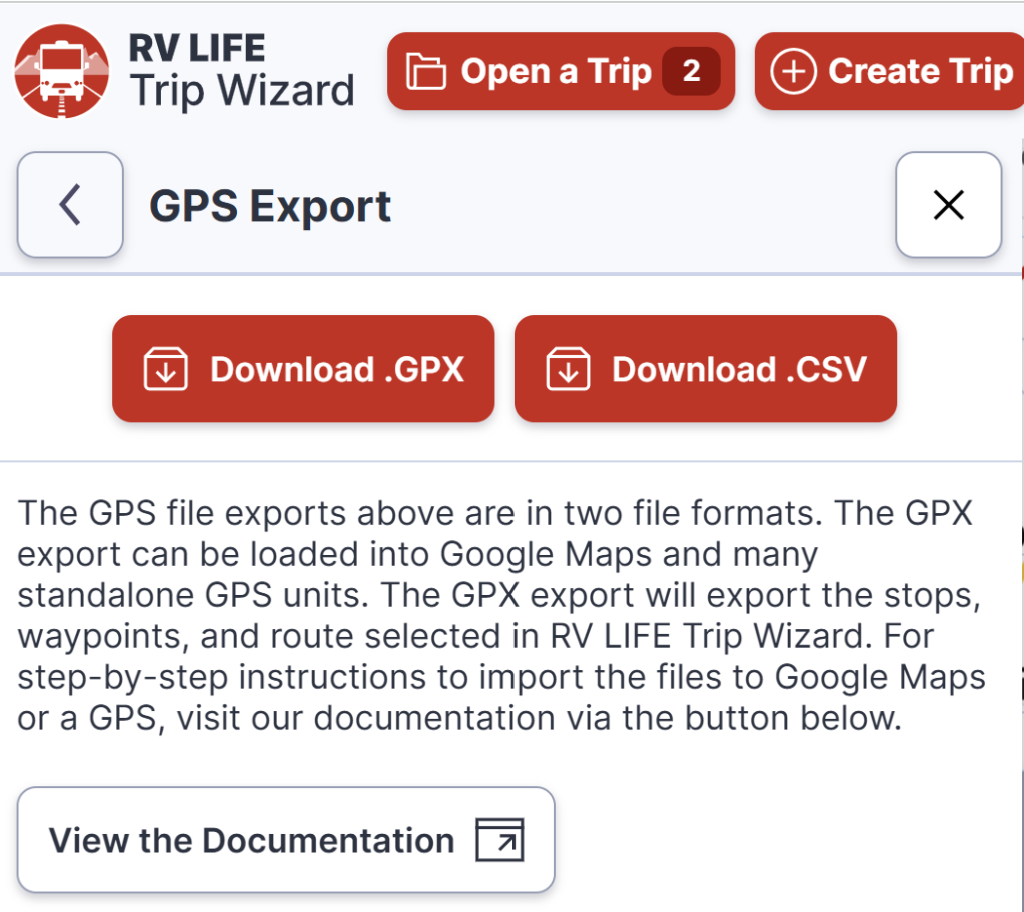
The process involves exporting your planned trip from Trip Wizard, importing the GPX file into Garmin’s free BaseCamp desktop software, and then transferring the trip to your connected Garmin GPS.
This isn’t something we personally use—we prefer to use Trip Wizard for planning and our Garmin separately for navigation—but it’s nice to have the option if you want to plan your trip in Trip Wizard and then move that trip over to your Garmin.
Just keep in mind that compatibility and how transferred routes are handled can vary by Garmin model, so it’s worth checking Garmin’s instructions for your particular GPS.
Trip Wizard for Planning, Garmin for Driving
Rather than thinking of RV Trip Wizard and Garmin as competing products, we think of them as two parts of our travel setup:
- RV LIFE Trip Wizard: Planning the overall trip, choosing stops, researching campgrounds, checking driving distances, and building our route.
- Garmin RV GPS: Turn-by-turn navigation while we’re actually driving the motorhome.
- Google Maps: Useful for another look at a route, checking traffic, satellite views, and getting around once the motorhome is parked and we’re exploring in the Bronco.
No routing system is perfect, so we don’t blindly follow any of them. If a route doesn’t look right, we’ll double-check it before committing a 38-foot motorhome to a road we’re unsure about.
That’s especially important when we’re dealing with low clearances, steep grades, weight restrictions, construction, or roads that simply aren’t a good choice for a large RV.
For us, RV Trip Wizard does the heavy lifting before the travel day begins, while our Garmin takes over once we’re behind the wheel. We wouldn’t give up Trip Wizard just because we own a dedicated RV GPS—the two tools solve different parts of the same problem.
What We Like About RV LIFE Pro — and What We Don’t
After using RV LIFE Pro and Trip Wizard to plan our RV travels, there are several features that keep us using it year after year. At the same time, we don’t use everything included with the subscription, and there are a few areas where we prefer other tools.
What We Like About RV LIFE Pro
Trip Wizard works for trips big and small.
This is the biggest reason we continue using RV LIFE Pro. We use the same planner for a simple move between campgrounds or a months-long trip with dozens of stops. We don’t have to change how we plan just because the trip gets bigger.
RV-specific routing gives us a better starting point.
Being able to enter the height, length, weight, and other information about our motorhome is important to us. We’re much more comfortable starting with a route designed around an RV than simply asking a standard navigation app for directions.
The Driving Radius is genuinely useful.
We use the 200, 300, and 400-mile ranges when deciding how far we might want to travel. Being able to see those distances on the map makes it much easier to identify possible campground stops without constantly calculating mileage.
We can see the entire trip in one place.
This becomes increasingly valuable as a trip gets more complicated. Our 43-stop trip in 2023 is the best example. Being able to zoom out, see the entire journey, and then work on individual travel days helps us understand how all the pieces fit together.
RV LIFE Campgrounds helps us research where to stay.
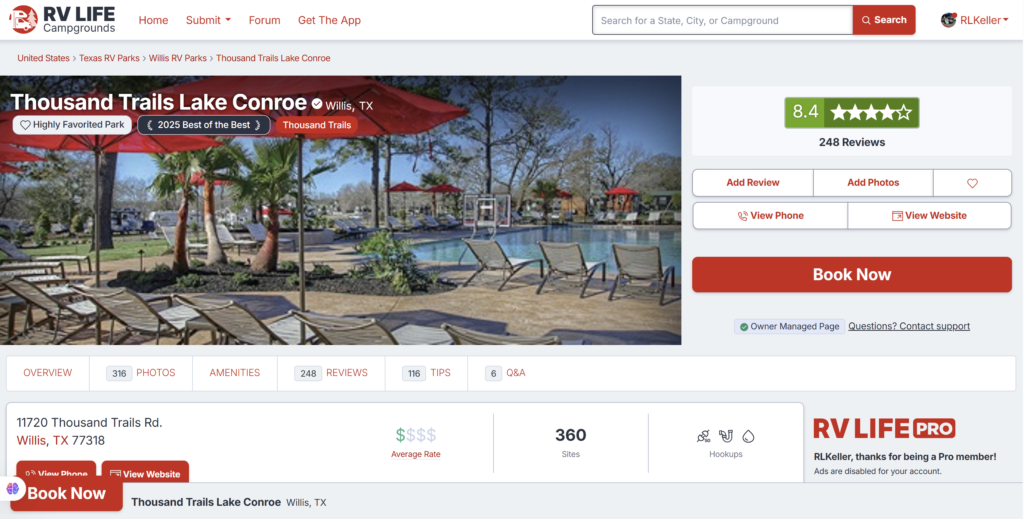
We also use RV LIFE Campgrounds when we’re researching potential places to stay. We especially like being able to read reviews from other RVers before choosing a campground.
The campground’s own website can tell us about its amenities, but reviews from people who have actually stayed there can reveal things that aren’t always obvious from the campground’s description. Site conditions, road noise, maneuvering a larger RV through the campground, Wi-Fi, and other details can all make a difference.
RV LIFE Campgrounds also includes photos, amenities, tips, Q&A, and other campground information. It works particularly well alongside Trip Wizard because we can find a potential campground while building our route and then do some additional research before deciding whether we want to stay there.
It doesn’t lock us into RV LIFE for navigation.
We also like having choices once the trip is planned. We can use RV LIFE’s RV Safe GPS, continue using our dedicated Garmin as we normally do, or export a GPX file for use with compatible GPS units.
What We Don’t Use as Much
RV LIFE GPS isn’t our primary navigation system.
The RV LIFE mobile app includes RV-safe turn-by-turn navigation, but we still prefer our dedicated Garmin RV GPS when we’re driving the motorhome.
That’s a personal preference rather than a knock against RV LIFE GPS. We simply like having a dedicated navigation device mounted in front of us, which is why our normal routine is Trip Wizard for planning and Garmin for driving.
RV LIFE Maintenance Didn’t Work as Well for Us
I gave RV LIFE Maintenance a try and actually got partway through setting up our Thor Challenger. I entered our motorhome and several pieces of equipment, including our tires, generator, air conditioners, refrigerator, washer, dryer, microwave, tow bar, and other components.
The problem for me was the amount of setup involved. Even after entering all of that information, our maintenance schedule setup was only 33% complete. I found the process cumbersome enough that I never finished setting everything up, and it hasn’t become part of the way we track our RV maintenance.
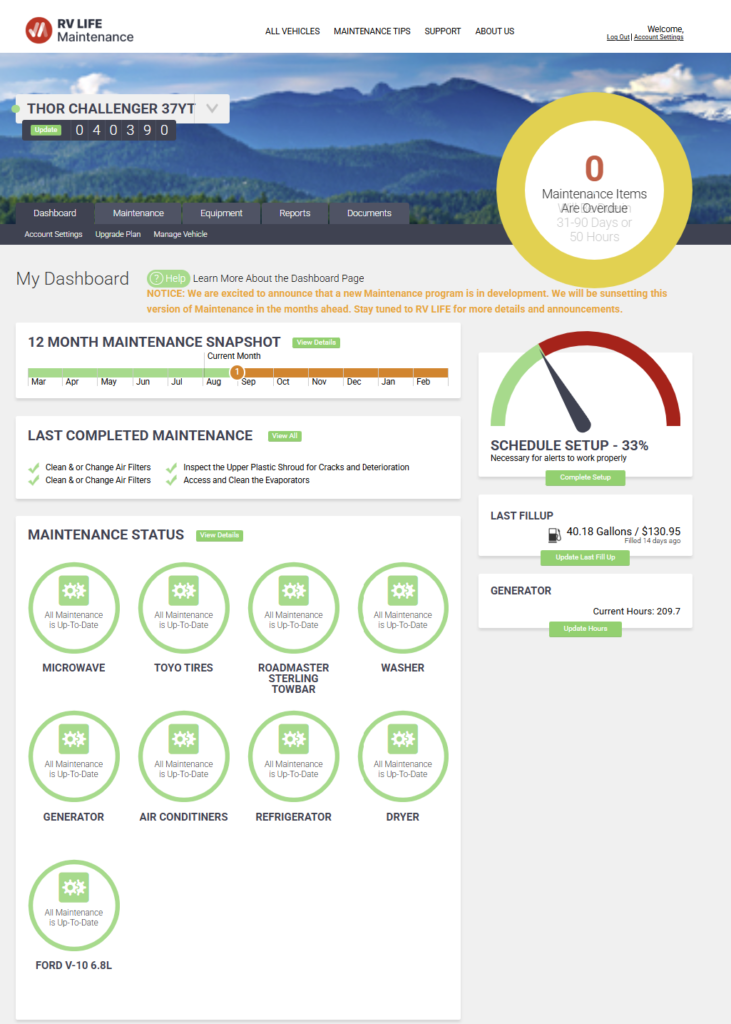
RV LIFE is currently developing a new version of its Maintenance program and says the version shown here will be discontinued in the coming months. That makes me interested in seeing what they change. If the new version makes the initial setup easier, I’ll give it another look.
For now, though, RV LIFE Maintenance isn’t a feature we use regularly.
You Don’t Have to Use Everything for RV LIFE Pro to Be Worth It
We don’t use every tool included with RV LIFE Pro equally, and we don’t think you have to.
For us, RV Trip Wizard is the main reason we subscribe to RV LIFE Pro, and RV LIFE Campgrounds is another part of the service we find useful when researching places to stay.
We prefer our Garmin for actual navigation, and RV LIFE Maintenance hasn’t become part of our routine. Other RVers may use the features differently, and that’s something to consider when deciding whether RV LIFE Pro is worth paying for.
We wouldn’t recommend subscribing simply because RV LIFE Pro comes with a long list of features. What matters is whether you’ll actually use the tools that are valuable to you.
For us, Trip Wizard is worth the subscription, and the campground research tools add additional value.
What We’d Like to See Improved
No RV trip-planning or navigation system is perfect, and we don’t treat RV LIFE as one. We still double-check routes when something doesn’t look right, especially when we’re dealing with low clearances, weight restrictions, steep grades, construction, or unfamiliar roads.
We’re also interested in seeing what RV LIFE does with the new Maintenance system. The current version required more setup than I wanted to put into it, so a simpler system could make that part of RV LIFE Pro considerably more useful to us.
The important thing for us is that RV LIFE Pro doesn’t have to replace every other travel tool we use. We use it for the things it does particularly well and use other tools when they work better for us.
Is RV LIFE Pro Worth $65 a Year?
RV LIFE Pro currently costs $65 per year, with a 7-day free trial for the annual plan. There is also a monthly option at $19.99 per month, but for RVers who plan to use it throughout the year, the annual subscription makes considerably more sense.
For us, RV LIFE Pro is worth the $65 annual cost primarily because of RV Trip Wizard.
We use Trip Wizard for all of our RV travel planning, from short campground moves to long, multi-stop trips. Considering how often we use it throughout the year, $65 isn’t a significant expense compared with the other costs involved in RV travel.
RV LIFE Campgrounds adds some value for us as well. We regularly use campground reviews when researching places to stay, so we’re getting more out of the subscription than Trip Wizard alone.
Who We Think RV LIFE Pro Is Best For
We think RV LIFE Pro makes the most sense if you:
- Travel regularly in an RV and want routing designed around your rig.
- Take multi-stop trips and want to see the entire journey in one place.
- Want to control how far you travel each day using tools like the Driving Radius.
- Research campgrounds and value reviews from other RVers.
- Travel in a larger motorhome, fifth wheel, or travel trailer where height, weight, and road restrictions matter.
- Want one planning system that can handle both a weekend trip and a months-long RV journey.
If you only take your RV out once or twice a year and already know exactly where you’re going, you may not get the same value from it that we do.
Would We Subscribe Again?
Yes.
We’ve been using RV LIFE Pro since 2020, so this isn’t a recommendation based on trying Trip Wizard for a few trips. It has been part of our RV trip-planning process for about six years.
During that time, we’ve used RV Trip Wizard to plan everything from short campground moves to major multi-stop journeys. Our 43-stop trip in 2023 is the biggest trip we’ve planned with it so far, but we continue using Trip Wizard for our everyday RV travels as well.
We don’t use every feature included with RV LIFE Pro. We prefer our Garmin for navigation, and the current Maintenance program didn’t work particularly well for us. But after using RV LIFE Pro since 2020, Trip Wizard continues to provide enough value that we’d subscribe again.
RV LIFE Campgrounds adds value for us too, particularly when we’re researching campgrounds and reading reviews from other RVers.
Trip Wizard is the main reason we pay for RV LIFE Pro, and after six years of using it, we still consider the annual subscription worthwhile.
Frequently Asked Questions About RV LIFE Pro
Final Thoughts on RV LIFE Pro
After using RV LIFE Pro since 2020, it has become a regular part of how we plan our RV travels. Whether we’re moving to a campground a few hours away or putting together a major multi-stop journey, RV Trip Wizard is usually one of the first tools we open when we start planning.
It isn’t the only travel tool we use, and that’s okay. We prefer our Garmin RV GPS when we’re actually driving, and RV LIFE Maintenance hasn’t worked particularly well for us in its current form. But RV Trip Wizard does what we need it to do well, and we also appreciate having RV LIFE Campgrounds available when we’re researching places to stay and reading reviews from other RVers.
After six years of using it for trips big and small, we’d subscribe to RV LIFE Pro again. If you’re trying to decide whether it’s right for the way you travel, the 7-day free trial is a good opportunity to build one of your own trips in Trip Wizard, enter your RV’s information, experiment with the Driving Radius, and see whether it makes your trip planning easier.
Ready to Plan Your Next RV Trip?
We’ve been using RV LIFE Pro since 2020, and RV Trip Wizard continues to be one of our main tools for planning RV trips big and small. The annual plan includes a 7-day free trial, so you can build your own trip, enter your RV’s information, and see if Trip Wizard works for the way you travel.
Free Trial: 7 days




I feel overwhelmed when I am planning RV routes. But I agree with you that hitting the road with no preparation at all can lead to terrible outcomes. Or in less dramatic scenarios, we miss on great locations or things to do. There is nothing more disappointing than having been close to a cool location and not visiting it.
I really like this article on RV living. It’s very informative, with a lot of good information, advice, and tips; especially for someone that is planning to go on the road for the first time.
This is actually something I thought about doing, I think it would be a lot of fun, I never thought it entailed so much planning tho, which is great. You wanna definitely know what to expect. Thank you, really enjoyed it.
Virginia
Thank you for your comments Virginia. With Covid a lot of people started RVing which has made it a bit harder to find places to stay and make planning more required. Before Covid you could hit the road and just go by the seat of your pants. Now a lot of places are booked up so planning stops is a necessity.
The article is well written and clear and with appropriately placed images. However, one consideration for me would be how appropriate are the items mentioned/recommended outside America? For example how useful or indeed is it available in Australia? How accurate are the locations and directions? I have found that Mr Google gets it wrong on many occasions here in Australia and sometimes sends you down a dead-end street!
I think the idea of the article is sound and helpful as far as the information goes but I’m not sure of the software/gadgets it promotes. That does not takeaway the usefulness of the article – there is still a need to plan and prepare for any travelling.
There are many links to RV Living in Australia but the “RV Life” mentioned in this article only comes up as American based. But hey, it prompted me to look! I find navigation devices more of a hindrance anyway because roads change, bridges built where there weren’t any when the device was set up, that is why I rely on physical maps and information from people along the way.
Thanks for the chance to read this, it had a lot of the things I used to do when travelling alone through America all those years ago – reading a map of the city the night before and finding how to get from A to B with minimum of fuss.
Thank you for your comments Lola. RV Life Pro is a North American set of Apps. They do work well for the U.S. and Canada as that’s where they are designed for. The directions are very accurate and updated more often than a paper map would be. I’m not a fan of Google Maps for RV use. RV’s are taller and longer than your normal passenger vehicle. Google doesn’t take these heights and lengths into consideration and can route you into a low clearance bridge or other obstacle you wouldn’t want to run into.
The GPS in the RV Life Pro app is made for RV’s specifically and takes these heights and lengths into account and routes you appropriately.
Thank you again for your comments. Happy Travels!